In this Lightboard Post of the Week, I answer a question about being able to do SAML IdP and SP on a single BIG-IP VE. Thanks to DevCentral Members hpr and Daniel Varela for the question and answer. +25 DC points for ya!
Posted Question on DevCentral: https://devcentral.f5.com/questions/apm-ltm-121-saml-idp-and-sp-possible-in-one-ve-58114
If you got an answer you'd like lit up on the Lightboard, let us know in the comments!
ps
Showing posts with label authentication. Show all posts
Showing posts with label authentication. Show all posts
Thursday, March 22, 2018


Friday, January 26, 2018
Post of the Week: Two-Factor Auth and SSO with BIG-IP
In this Lightboard Post of the Week, I answer a question about 2FA and SSO with AD/RSA on BIG-IP by creating a SSO Credential Mapping policy agent in the Visual Policy Editor, that takes the username and password from the logon page, and maps them to variables to be used for SSO services. Special thanks to senthil147 for the question and a new 2018 MVP, MrPlastic (Lee Sutcliffe, which I flubbed) for the great answer.
Posted Question on DevCentral: https://devcentral.f5.com/questions/2fa-authentication-with-sso-on-apm-57581
ps
Posted Question on DevCentral: https://devcentral.f5.com/questions/2fa-authentication-with-sso-on-apm-57581
ps
Tuesday, November 14, 2017
VDI Gateway Federation with BIG-IP
Today let’s look at how F5 BIGIP APM can consolidate, secure and federate all
the core VDI gateways technology. For instance, if an organization decides move
from one VDI technology to another or if you’re consolidating VDI technologies,
BIG-IP can help.
On the BIG-IP we’ve set up three VDI environments. Microsoft RDS/RDP with a broker authentication server, VMware Horizon and Citrix ZenApp. With only a corporate account, a user can authenticate to all of them as needed and access all available desktop content.
In this example, we connect to the BIG-IP APM. This is the default view.

And here we’ve put some advanced security fields like OTP or multifactor authentication for instance.


With a single, multifactor authentication we’re able to gain access to our federated BIG-IP Webtop and select the specific VDI resource we need.
From an administrative view, here is the full Visual Policy Editor (VPE) for
the overall solution. This also shows where the OTP/Grid is if you follow the
Host FQDN path.


Special thanks to F5 Sr. Security SE Matthieu Dierick for the
explanation and you can watch the demo video.
ps
On the BIG-IP we’ve set up three VDI environments. Microsoft RDS/RDP with a broker authentication server, VMware Horizon and Citrix ZenApp. With only a corporate account, a user can authenticate to all of them as needed and access all available desktop content.
In this example, we connect to the BIG-IP APM. This is the default view.

And here we’ve put some advanced security fields like OTP or multifactor authentication for instance.

So here we’d use our username and password and for additional security we'll
choose a secondary grid. By default, a grid is not generally available from any
of the VDI vendors. When we select grid, BIG-IP APM will present a grid for a
PIN entry. This is provided through a partnership with Gemalto. BIG-IP is connecting to Gemalto
servers to present the grid to the user. We then enter our confidential PIN.

Upon auth, we’re presented with our BIG-IP APM Webtop and BIG-IP did the
necessary single sign on for all the VDI technologies and environments assigned
to us.

With a single, multifactor authentication we’re able to gain access to our federated BIG-IP Webtop and select the specific VDI resource we need.

And here are the specific inspections and criteria for the VDI scenario. You can
see a path for each VDI vendor along with specific inspections and actions
depending on the situation.

Tuesday, October 10, 2017
Legacy Application SSO with BIG-IP and Okta
IT organizations have a simple goal: make it easy for workers to access all
their work applications from any device. But that simple goal becomes
complicated when new apps and old, legacy applications do not authenticate in
the same way.
Today we’ll take you through BIG-IP APM’s integration with Okta, a cloud-based identity-as-a-service provider.
The primary use case for this scenario is providing the user authentication through Okta and then Okta providing BIG-IP APM a SAML assertion so that BIG-IP can perform legacy SSO using either Kerberos Constrained Delegation (KCD) or Header Authentication. BIG-IP is the Service Provider (SP) in this SAML transaction.
As we log on to a BIG-IP, you’ll see that we have two policies/application examples.

Let’s click on the Edit button under Access Policy for app1-saml-sp-okta.
This takes us to the Visual Policy Editor (VPE) for the first application. As
the chart flows, BIG-IP is consuming the SAML authentication, then storing the
SSO credentials and doing a Variable Assign so we know who the user is.

The next entry, app3-saml-sp-okta, looks very similar.

One of the things that is different however is for Header Authentication,
we’re using a Per Request Policy. You can view/configure this by going to Access Policy>Per Request Policy.

We click Edit (under Access
Policy) and here via the flow, the user enters and on every request, we’re
going to remove the Okta header name, which is arbitrary and doesn’t need to be
that value – could be any value you choose. But we want to make sure that no
one is able to pad that header into a request. So, we’ll remove it and insert
the variables BIG-IP receives from Okta. This way the application can consume
it and we know who that user is.

So, what does it look like.
First, we’ll log into Okta and in the portal, we see two applications – the Header Auth and Kerberos Auth.

We’ll test the Header authentication first and see that we’re logged into
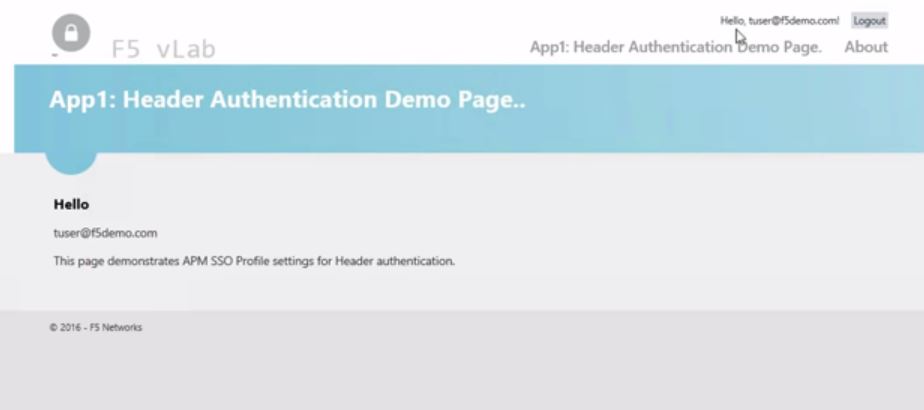
App1 using Header authentication. Tuser@f5demo.com
was the account we logged into with Okta and we see the application has been
single-signed into using that credential.

Now let’s hit that Kerberos auth application. Here again, we’ve been SSO’d
into the application. You may notice that the user looks a bit different here
as F5DEMO\tuser since this time we used Kerberos Constrained Delegation. So,
we’ve obtained a Kerberos ticket from the domain controller for F5DEMO as the
user to use. So the username can look a little different but it’s mainly about
formatting.

BIG-IP is able to consume that SAML assertion from Okta and then use SSO capabilities via Header or Kerberos for legacy applications. Watch Cody Green’s excellent demo of this integration.
ps
Today we’ll take you through BIG-IP APM’s integration with Okta, a cloud-based identity-as-a-service provider.
The primary use case for this scenario is providing the user authentication through Okta and then Okta providing BIG-IP APM a SAML assertion so that BIG-IP can perform legacy SSO using either Kerberos Constrained Delegation (KCD) or Header Authentication. BIG-IP is the Service Provider (SP) in this SAML transaction.
As we log on to a BIG-IP, you’ll see that we have two policies/application examples.


First, we’ll log into Okta and in the portal, we see two applications – the Header Auth and Kerberos Auth.


BIG-IP is able to consume that SAML assertion from Okta and then use SSO capabilities via Header or Kerberos for legacy applications. Watch Cody Green’s excellent demo of this integration.
ps
Tuesday, March 14, 2017
Social Login to Enterprise Apps using BIG-IP & OAuth 2.0

With v13, BIG-IP APM offers a rich set of OAuth capabilities allowing organizations to implement OAuth Client, OAuth Resource Server and OAuth Authorization Server roles to implement social logins.
Let's look at BIG-IP’s capabilities (from the user's perspective) as an OAuth Client, OAuth Resource Server. We’ll navigate to our BIG-IP login screen and immediately you’ll notice it looks slightly different than your typical APM login.

Here, you now have a choice and can authenticate using any one of the 4 external resources. Azure AD Enterprise and AD B2C along with Google and Facebook. Google and Facebook are very popular social login choices - as shown in the initial image above - where organizations are looking to authenticate the users and allow them to authorize the sharing of information that Google and Facebook already have, with the application.
In this case, we have an application behind BIG-IP that is relying on getting such information from an external third party. For this, we’ll select Facebook. When we click logon, BIG-IP will redirect to the Facebook log into screen.

Now we’ll need to log into Facebook using our own personal information. And with that, Facebook has authenticated us and has sent BIG-IP critical info like name, email and other parameters.

BIG-IP has accepted the OAuth token passed to it from Facebook, extracted the info from the OAuth scope and now the application knows my identity and what resources I’m authorized to access.
We can do the same with Google. Select the option, click logon and here we’re redirected to the Google authentication page. Here again, we enter our personal credentials and arrive at the same work top.

Like Facebook, Google sent an authorization code to BIG-IP, BIG-IP validated it, extracted the username from the OAuth scope, passed it to the backend application so the application knows who I am and what I can access.
Let's look at Microsoft. For Microsoft, we can authenticate using a couple editions of Azure AD – Enterprise and B2C. Let’s see how Enterprise works. Like the others, we get redirected to Microsoftonline.com to enter our MS Enterprise credentials.
In this instance, we’re using an account that’s been Federated to Azure AD from another BIG-IP and we’ll authenticate to that BIG-IP. At this point that BIG-IP will issue a SAML assertion to Azure AD to authenticate me to Azure AD. After that, Azure AD will issue an OAuth token to that BIG-IP. BIG-IP will accept it, extract the user information and pass it to the application.
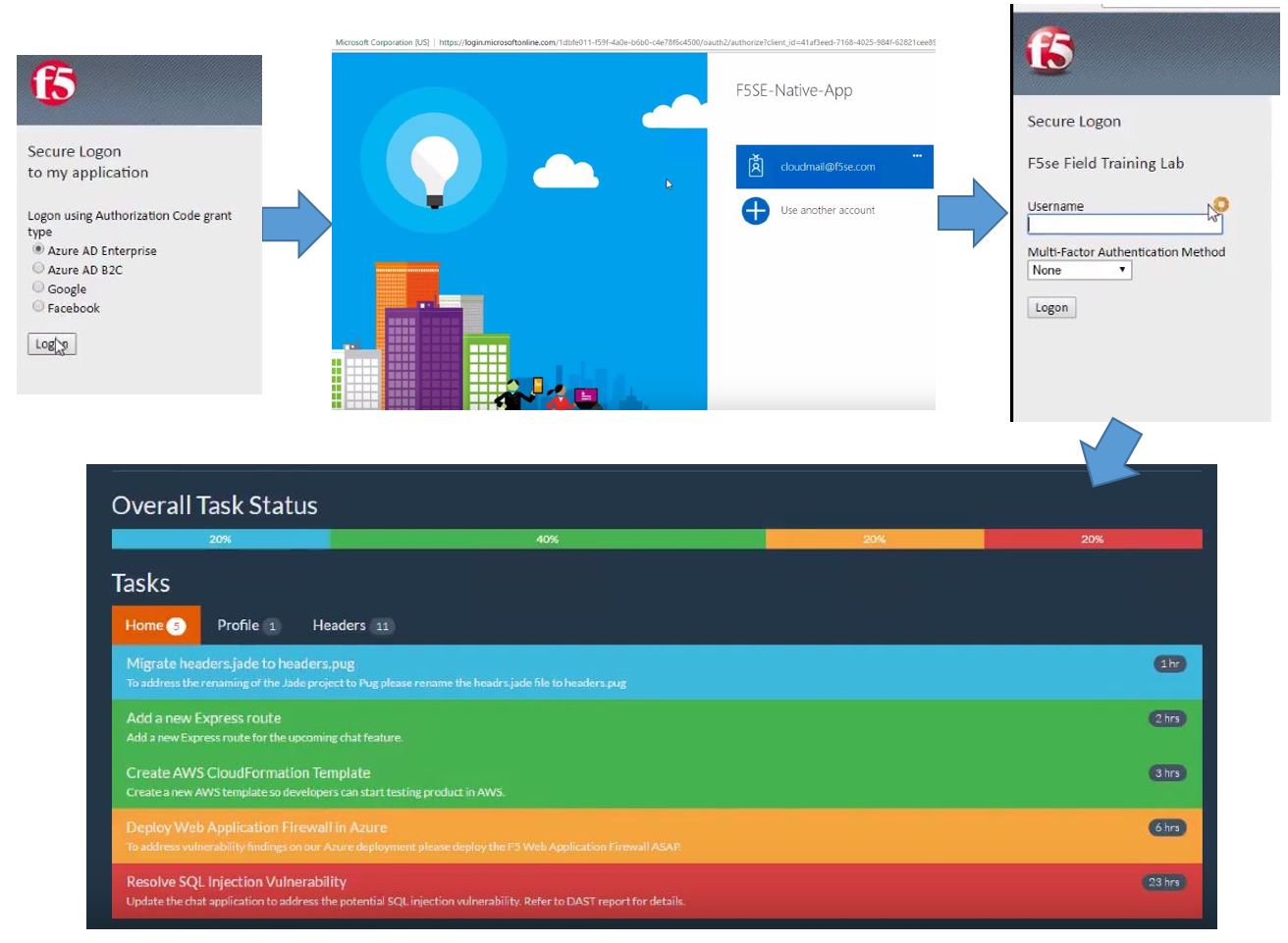

We’ll enter our personal info, the servers communicate and we’re dropped into our WebTop of resources.
Social logins can not only help enterprises offer access to certain resources, it also improves the overall customer experience with speed and convenience and allows organizations to capture essential information about their online customers.
ps
Related:
Wednesday, December 14, 2016
Lightboard Lessons: SSO to Legacy Web Applications
IT organizations have a simple goal: make it easy for workers to access all
their work applications from any device. But that simple goal becomes
complicated when new apps and old, legacy applications do not authenticate in
the same way.
In this Lightboard Lesson, I draw out how VMware and F5 helps remove these complexities and enable productive, any-device app access. By enabling secure SSO to Kerberos constrained delegation (KCD) and header-based authentication apps, VMware Workspace ONE and F5 BIG-IP APM help workers securely access all the apps they need—mobile, cloud and legacy—on any device anywhere.
ps
Related:
In this Lightboard Lesson, I draw out how VMware and F5 helps remove these complexities and enable productive, any-device app access. By enabling secure SSO to Kerberos constrained delegation (KCD) and header-based authentication apps, VMware Workspace ONE and F5 BIG-IP APM help workers securely access all the apps they need—mobile, cloud and legacy—on any device anywhere.
ps
Related:
Tuesday, February 23, 2016
Would You Put Corporate Applications in the Cloud?

This growth is to support our on-demand, always connected lifestyle, where content and information must be accessible/available anytime, anywhere, and on any screen. Mobility is the new normal, and the cloud is the platform to deliver this content. No wonder enterprises are scrambling to add cloud components to their existing infrastructure to provide agility, flexibility, and secure access to support the overall business strategy. Applications that used to take months to launch now take minutes, and organizations can take advantage of innovations quickly. But most IT organizations want the cloud benefits without the risks. They want the economics and speed of the cloud without worrying about the security and integration challenges.
Use of the corporate network itself has become insecure, even with firewalls in place. Gone are the days of “trusted” and “untrusted,” as the internal network is now dangerous. It'll only get worse once all those IoT wearables hit the office. Even connecting to the corporate network via VPN can be risky due to the network challenges. Today, almost anything can pose a potential security risk, and unauthorized access is a top data security concern.
Going against the current trend, some organizations are now placing critical applications in the cloud and facing the challenge of providing secure user access. This authentication is typically handled by the application itself, so user credentials are often stored and managed in the cloud by the provider. Organizations, however, need to keep close control over user credentials, and for global organizations, the number of identity systems can be in the thousands, scattered across geographies, markets, brands, or acquisitions. It becomes a significant challenge for IT to properly authenticate the person (whether located inside or outside the corporate network) to a highly available identity provider (such as Active Directory) and then direct them to the proper resources. The goal is to allow access to corporate data from anywhere with the right device and credentials. Speed and productivity are key.
Authentication, authorization, and encryption help provide the fine-grained access, regardless of the user’s location and network. Employee access is treated the same whether the user is at a corporate office, at home, or connected to an open, unsecured Wi-Fi network at a bookstore. This eliminates the traditional VPN connection to the corporate network and also encrypts all connections to corporate information, even from the internal network.
In this scenario, an organization can deploy the BIG-IP platform, especially virtual editions, in both the primary and cloud data centers. BIG-IP intelligently manages all traffic across the servers. One pair of BIG-IP devices sits in front of the servers in the core network; another pair sits in front of the directory servers in the perimeter network. By managing traffic to and from both the primary and directory servers, the F5 devices ensure the availability and security of cloud resources—for both internal and external (federated) employees. In addition, directory services can stay put as the BIG-IP will simply query those to determine appropriate access.
While there are some skeptics, organizations like GE and Google are already transitioning their corporate applications to cloud deployments and more are following. As Jamie Miller, President & CEO at GE Transportation, says, 'Start Small, Start Now.'
ps
Related:
- CIOs Face Cloud Computing Challenges, Pitfalls
- Google Moves Its Corporate Applications to the Internet
- GE's Transformation... Start Small, Start Now
- Ask the Expert Why Identity and Access Management?
| Connect with Peter: | Connect with F5: |
![o_linkedin[1]](https://devcentral.f5.com/weblogs/images/devcentral_f5_com/weblogs/macvittie/1086440/o_linkedin.png "o_linkedin[1]") ![o_rss[1]](https://lh3.googleusercontent.com/blogger_img_proxy/AEn0k_vDYBY-fGAlkMQ0xmN1alGE7D5KNd6ne_lUWKOXJOb8walx7gfbhIcEgg6IdqOKE0slN_7UpuQxRsg8QKgbKcLGaEUd8nU7DPDjFfEaHyAzRjzEfx-FRCfFa83ht4sj0wKv2CXSPvkEXBtxuTWzWm_iRaC07aqh4AkkIUmuq5c5kw=s0-d "o_rss[1]") ![o_twitter[1]](https://devcentral.f5.com/weblogs/images/devcentral_f5_com/weblogs/macvittie/1086440/o_twitter.png "o_twitter[1]") |
![o_facebook[1]](https://devcentral.f5.com/weblogs/images/devcentral_f5_com/weblogs/macvittie/1086440/o_facebook.png "o_facebook[1]") ![o_slideshare[1]](https://devcentral.f5.com/weblogs/images/devcentral_f5_com/weblogs/macvittie/1086440/o_slideshare.png "o_slideshare[1]") ![o_youtube[1]](https://devcentral.f5.com/weblogs/images/devcentral_f5_com/weblogs/macvittie/1086440/o_youtube.png "o_youtube[1]") |
Tuesday, April 21, 2015
RSA2015 Partner Spotlight - RSA Risk Based Authentication
RSA Technology Consultant Josh Waterloo talks about the evolution of two-factor authentication and how risk based auth is starting to take hold. He also shows us a demo of the integration between RSA SecurID and BIG-IP APM to provide risk based, strong authentication for corporate access to sensitive information.
ps
Related
| Connect with Peter: | Connect with F5: |
| | |
Friday, November 15, 2013
AWS re:Invent 2013 – Cloud Federation Reference Architecture (feat. Pearce)
Nathan Pearce and I yuck it up on camera again, this time commiserating about Cloud Federation and the challenges associated with identity and access management in the cloud.
ps
Related:
- AWS re:Invent 2013 – Find F5
- AWS re:Invent 2013 - Cloud Bursting Reference Architecture (feat. Pearce)
- AWS re:Invent 2013 – Cloud Migration Reference Architecture (feat. Pearce)
- AWS re:Invent 2013 – F5 AWS Solutions (feat. Pearce & Huang)
- F5 Adds Pay-Per-Use Billing and New Solutions for Amazon Web Services
- F5 and Amazon Web Services | Partnership Overview [PDF]
- F5 and Amazon Web Services (Video)
- Deploying a BIG-IP Virtual Edition HA Pair into AWS (Video)
- Now Playing on Amazon AWS - BIG-IP
- F5 BIG-IP Virtual Edition for AWS (BYOL)
- F5 BIG-IQ Virtual Edition for AWS (BYOL)
- F5 Synthesis: The Reference Architectures
Technorati Tags: f5,big-ip,aws,aws re:invent,find f5,synthesis,cloud,federation,saml,identity,amazon,silva,video,byol,reference architecture,saas
| Connect with Peter: | Connect with F5: |
| | |
Thursday, January 31, 2013
Inside Look - SAML Federation with BIG-IP APM
I get an Inside Look at BIG-IP's new #SAML #Federation functionality in v11.3 with Sr Security Solution Architect, Gary Zaleski. We cover BIG-IP as a SAML Service Provider (SP) and as a SAML Identity Provider (IdP). Watch how users can easily connect to Salesforce, SharePoint, Office365 and Google. Solving Substantiation with SAML.
ps
Related:
- Solving Substantiation with SAML – White Paper (pdf)
- In 5 Minutes or Less: BIG-IP Advanced Firewall Manager
- Inside Look - BIG-IP Advanced Firewall Manager
- BIG-IP Access Policy Manager Overview (pdf)
- F5 Enhances Application Delivery Security with the World’s Fastest Firewall
- F5's YouTube Channel
- In 5 Minutes or Less Series (23 videos – over 2 hours of In 5 Fun)
- Inside Look Series
- Life@F5
Technorati Tags: saml,authentication,f5,apm,cloud computing,big-ip,silva,video,inside look,federation
| Connect with Peter: | Connect with F5: |
![o_rss[1]](https://devcentral.f5.com/weblogs/images/devcentral_f5_com/weblogs/macvittie/1086440/o_rss.png "o_rss[1]") | |
Subscribe to:
Posts (Atom)

