In this Lightboard Post of the Week, I answer a question about being able to do SAML IdP and SP on a single BIG-IP VE. Thanks to DevCentral Members hpr and Daniel Varela for the question and answer. +25 DC points for ya!
Posted Question on DevCentral: https://devcentral.f5.com/questions/apm-ltm-121-saml-idp-and-sp-possible-in-one-ve-58114
If you got an answer you'd like lit up on the Lightboard, let us know in the comments!
ps
Showing posts with label saml. Show all posts
Showing posts with label saml. Show all posts
Thursday, March 22, 2018


Tuesday, October 10, 2017
Legacy Application SSO with BIG-IP and Okta
IT organizations have a simple goal: make it easy for workers to access all
their work applications from any device. But that simple goal becomes
complicated when new apps and old, legacy applications do not authenticate in
the same way.
Today we’ll take you through BIG-IP APM’s integration with Okta, a cloud-based identity-as-a-service provider.
The primary use case for this scenario is providing the user authentication through Okta and then Okta providing BIG-IP APM a SAML assertion so that BIG-IP can perform legacy SSO using either Kerberos Constrained Delegation (KCD) or Header Authentication. BIG-IP is the Service Provider (SP) in this SAML transaction.
As we log on to a BIG-IP, you’ll see that we have two policies/application examples.

Let’s click on the Edit button under Access Policy for app1-saml-sp-okta.
This takes us to the Visual Policy Editor (VPE) for the first application. As
the chart flows, BIG-IP is consuming the SAML authentication, then storing the
SSO credentials and doing a Variable Assign so we know who the user is.

The next entry, app3-saml-sp-okta, looks very similar.

One of the things that is different however is for Header Authentication,
we’re using a Per Request Policy. You can view/configure this by going to Access Policy>Per Request Policy.

We click Edit (under Access
Policy) and here via the flow, the user enters and on every request, we’re
going to remove the Okta header name, which is arbitrary and doesn’t need to be
that value – could be any value you choose. But we want to make sure that no
one is able to pad that header into a request. So, we’ll remove it and insert
the variables BIG-IP receives from Okta. This way the application can consume
it and we know who that user is.

So, what does it look like.
First, we’ll log into Okta and in the portal, we see two applications – the Header Auth and Kerberos Auth.

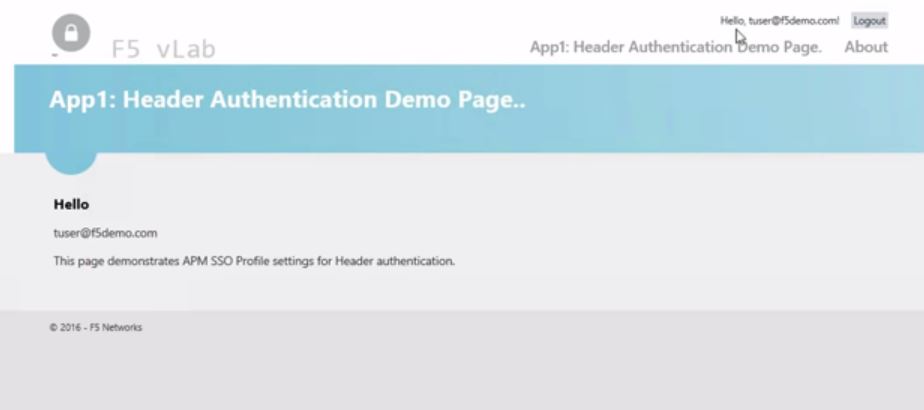
We’ll test the Header authentication first and see that we’re logged into
App1 using Header authentication. Tuser@f5demo.com
was the account we logged into with Okta and we see the application has been
single-signed into using that credential.

Now let’s hit that Kerberos auth application. Here again, we’ve been SSO’d
into the application. You may notice that the user looks a bit different here
as F5DEMO\tuser since this time we used Kerberos Constrained Delegation. So,
we’ve obtained a Kerberos ticket from the domain controller for F5DEMO as the
user to use. So the username can look a little different but it’s mainly about
formatting.

BIG-IP is able to consume that SAML assertion from Okta and then use SSO capabilities via Header or Kerberos for legacy applications. Watch Cody Green’s excellent demo of this integration.
ps
Today we’ll take you through BIG-IP APM’s integration with Okta, a cloud-based identity-as-a-service provider.
The primary use case for this scenario is providing the user authentication through Okta and then Okta providing BIG-IP APM a SAML assertion so that BIG-IP can perform legacy SSO using either Kerberos Constrained Delegation (KCD) or Header Authentication. BIG-IP is the Service Provider (SP) in this SAML transaction.
As we log on to a BIG-IP, you’ll see that we have two policies/application examples.


First, we’ll log into Okta and in the portal, we see two applications – the Header Auth and Kerberos Auth.


BIG-IP is able to consume that SAML assertion from Okta and then use SSO capabilities via Header or Kerberos for legacy applications. Watch Cody Green’s excellent demo of this integration.
ps
Wednesday, December 14, 2016
Lightboard Lessons: SSO to Legacy Web Applications
IT organizations have a simple goal: make it easy for workers to access all
their work applications from any device. But that simple goal becomes
complicated when new apps and old, legacy applications do not authenticate in
the same way.
In this Lightboard Lesson, I draw out how VMware and F5 helps remove these complexities and enable productive, any-device app access. By enabling secure SSO to Kerberos constrained delegation (KCD) and header-based authentication apps, VMware Workspace ONE and F5 BIG-IP APM help workers securely access all the apps they need—mobile, cloud and legacy—on any device anywhere.
ps
Related:
In this Lightboard Lesson, I draw out how VMware and F5 helps remove these complexities and enable productive, any-device app access. By enabling secure SSO to Kerberos constrained delegation (KCD) and header-based authentication apps, VMware Workspace ONE and F5 BIG-IP APM help workers securely access all the apps they need—mobile, cloud and legacy—on any device anywhere.
ps
Related:
Wednesday, November 4, 2015
Ask the Expert – Why Identity and Access Management?
Michael Koyfman, Sr. Global Security Solution Architect, shares the access challenges organizations face when deploying SaaS cloud applications. Syncing data stores to the cloud can be risky so organizations need to utilize their local directories and assert the user identity to the cloud. SAML is a standardized way of asserting trust and Michael explains how BIG-IP can act either as an identity provider or a service provider so users can securely access their workplace tools. Integration is key to solve common problems for successful and secure deployments.
ps
Related:
- Ask the Expert – Are WAFs Dead?
- Ask the Expert – Why SSL Everywhere?
- Ask the Expert – Why Web Fraud Protection?
- Application Availability Between Hybrid Data Centers
- F5 Access Federation Solutions
- Inside Look - SAML Federation with BIG-IP APM
- RSA 2014: Layering Federated Identity with SWG (feat Koyfman)
| Connect with Peter: | Connect with F5: |
![o_linkedin[1]](https://devcentral.f5.com/weblogs/images/devcentral_f5_com/weblogs/macvittie/1086440/o_linkedin.png "o_linkedin[1]") ![o_rss[1]](https://lh3.googleusercontent.com/blogger_img_proxy/AEn0k_vDYBY-fGAlkMQ0xmN1alGE7D5KNd6ne_lUWKOXJOb8walx7gfbhIcEgg6IdqOKE0slN_7UpuQxRsg8QKgbKcLGaEUd8nU7DPDjFfEaHyAzRjzEfx-FRCfFa83ht4sj0wKv2CXSPvkEXBtxuTWzWm_iRaC07aqh4AkkIUmuq5c5kw=s0-d "o_rss[1]") ![o_twitter[1]](https://devcentral.f5.com/weblogs/images/devcentral_f5_com/weblogs/macvittie/1086440/o_twitter.png "o_twitter[1]") | ![o_facebook[1]](https://devcentral.f5.com/weblogs/images/devcentral_f5_com/weblogs/macvittie/1086440/o_facebook.png "o_facebook[1]") ![o_slideshare[1]](https://devcentral.f5.com/weblogs/images/devcentral_f5_com/weblogs/macvittie/1086440/o_slideshare.png "o_slideshare[1]") ![o_youtube[1]](https://devcentral.f5.com/weblogs/images/devcentral_f5_com/weblogs/macvittie/1086440/o_youtube.png "o_youtube[1]") |
Wednesday, November 19, 2014
Collaborate in the Cloud
Employee collaboration and access to communication tools are essential for workplace productivity. Organizations are increasing their use of Microsoft Office 365, a subscription-based service that provides hosted versions of familiar Microsoft applications. Most businesses choose Exchange Online as the first app in Office 365 they adopt.
The challenge with any SaaS application such as Office 365 is that user authentication is usually handled by the application itself, so user credentials are typically stored and managed in the cloud by the provider. The challenge for IT is to properly authenticate the employee (whether located inside or outside the corporate network) to a highly available identity provider (such as Active Directory).
Authentication without complexity

Even though Office 365 runs in a Microsoft-hosted cloud environment, user authentication and authorization are often accomplished by federating on premises Active Directory with Office 365. Organizations subscribing to Office 365 may deploy Active Directory Federation Services (ADFS) on premises, which then authenticates users against Active Directory.
Deploying ADFS typically required organizations to deploy, manage, and maintain additional servers onsite, which can complicate or further clutter the infrastructure with more hardware. SAML (security assertion markup language) is often the enabler to identify and authenticate the user. It then directs the user to the appropriate Office 365 service location to access resources. SAML-enabled applications work by accepting user authentication from a trusted third party—an identity provider. In the case of Office 365, the BIG-IP platform acts as the identity provider.
For example, when a user requests his or her OWA email URL via a browser using Office 365, that user is redirected to a BIG-IP logon page to validate the request. The BIG-IP system authenticates the user on behalf of Office 365 and then grants access. The Office 365 environment will recognize the individual and provide their unique Office 365 OWA email environment. The BIG-IP platform provides a seamless experience for Office 365 users and with the federated identity that the BIG-IP platform enables, the IT team is able to extend SSO capabilities to other applications.
The benefit of using the BIG-IP platform to support Office 365 with SAML is that organizations can reduce the complexity and requirements of deploying ADFS. By default, when enabling Office 365, administrators need to authenticate those users in the cloud. If an IT administrator wants to use the corporate authentication mechanism, ADFS must be put into the corporate infrastructure. With the BIG-IP platform, organizations can support authentication to Office 365 and the ADFS requirement disappears, resulting in centralized access control with improved security.
Secure collaboration
Because email is a mission-critical application for most organizations, it is typically deployed on premises. Organizations using BIG-IP-enhanced Microsoft Exchange Server and Outlook can make it easier for people to collaborate regardless of their location. For example, if a company wanted to launch a product in Europe that had been successfully launched in the United States, it needs workers and contractors in both locations to be able to communicate and share information.
In the past, employees may have emailed plain-text files to each other as attachments or posted them online using a web-based file hosting service. This can create security concerns since potentially confidential information is leaving the organization and being stored on the Internet without any protection or encryption. There are also concerns about ease of use for employees and how the lack of an efficient collaboration tool negatively impacts productivity.
Internal and external availability 24/7
To solve these issues, many organizations move from the locally managed Exchange Server deployment to Microsoft Office 365. Office 365 makes it easier for employees to work together no matter where they are in the world. Employees connect to Office 365 using only a browser, and they don’t have to remember multiple usernames and passwords to access email, SharePoint, or other internal-only applications and file shares.
In this scenario, an organization would deploy the BIG-IP platform in both the primary and secondary data centers. BIG-IP LTM intelligently manages all traffic across the servers. One pair of BIG-IP devices sits in front of the servers in the core network; another pair sits in front of the directory servers in the perimeter network. By managing traffic to and from both the primary and directory servers, the F5 devices ensure availability of Office 365—for both internal and external (federated) users.
Ensuring global access
To provide for global application performance and disaster recovery, organizations should also deploy BIG-IP GTM devices in the perimeter network at each data center. BIG-IP GTM scales and secures the DNS infrastructure, provides high-speed DNS query responses, and also reroutes traffic when necessary to the most available application server. Should an organization’s primary data center ever fail, BIG-IP GTM would automatically reroute all traffic to the backup data center. BIG-IP GTM can also load balance the directory servers across data centers to provide cross-site resiliency.
The BIG-IP platform provides the federated identity services and application availability to allow organizations to make a quick migration to Office 365, ensuring users worldwide will always have reliable access to email, corporate applications, and data.
ps
Related:
The challenge with any SaaS application such as Office 365 is that user authentication is usually handled by the application itself, so user credentials are typically stored and managed in the cloud by the provider. The challenge for IT is to properly authenticate the employee (whether located inside or outside the corporate network) to a highly available identity provider (such as Active Directory).
Authentication without complexity

Even though Office 365 runs in a Microsoft-hosted cloud environment, user authentication and authorization are often accomplished by federating on premises Active Directory with Office 365. Organizations subscribing to Office 365 may deploy Active Directory Federation Services (ADFS) on premises, which then authenticates users against Active Directory.
Deploying ADFS typically required organizations to deploy, manage, and maintain additional servers onsite, which can complicate or further clutter the infrastructure with more hardware. SAML (security assertion markup language) is often the enabler to identify and authenticate the user. It then directs the user to the appropriate Office 365 service location to access resources. SAML-enabled applications work by accepting user authentication from a trusted third party—an identity provider. In the case of Office 365, the BIG-IP platform acts as the identity provider.
For example, when a user requests his or her OWA email URL via a browser using Office 365, that user is redirected to a BIG-IP logon page to validate the request. The BIG-IP system authenticates the user on behalf of Office 365 and then grants access. The Office 365 environment will recognize the individual and provide their unique Office 365 OWA email environment. The BIG-IP platform provides a seamless experience for Office 365 users and with the federated identity that the BIG-IP platform enables, the IT team is able to extend SSO capabilities to other applications.
The benefit of using the BIG-IP platform to support Office 365 with SAML is that organizations can reduce the complexity and requirements of deploying ADFS. By default, when enabling Office 365, administrators need to authenticate those users in the cloud. If an IT administrator wants to use the corporate authentication mechanism, ADFS must be put into the corporate infrastructure. With the BIG-IP platform, organizations can support authentication to Office 365 and the ADFS requirement disappears, resulting in centralized access control with improved security.
Secure collaboration
Because email is a mission-critical application for most organizations, it is typically deployed on premises. Organizations using BIG-IP-enhanced Microsoft Exchange Server and Outlook can make it easier for people to collaborate regardless of their location. For example, if a company wanted to launch a product in Europe that had been successfully launched in the United States, it needs workers and contractors in both locations to be able to communicate and share information.
In the past, employees may have emailed plain-text files to each other as attachments or posted them online using a web-based file hosting service. This can create security concerns since potentially confidential information is leaving the organization and being stored on the Internet without any protection or encryption. There are also concerns about ease of use for employees and how the lack of an efficient collaboration tool negatively impacts productivity.
Internal and external availability 24/7
To solve these issues, many organizations move from the locally managed Exchange Server deployment to Microsoft Office 365. Office 365 makes it easier for employees to work together no matter where they are in the world. Employees connect to Office 365 using only a browser, and they don’t have to remember multiple usernames and passwords to access email, SharePoint, or other internal-only applications and file shares.
In this scenario, an organization would deploy the BIG-IP platform in both the primary and secondary data centers. BIG-IP LTM intelligently manages all traffic across the servers. One pair of BIG-IP devices sits in front of the servers in the core network; another pair sits in front of the directory servers in the perimeter network. By managing traffic to and from both the primary and directory servers, the F5 devices ensure availability of Office 365—for both internal and external (federated) users.
Ensuring global access
To provide for global application performance and disaster recovery, organizations should also deploy BIG-IP GTM devices in the perimeter network at each data center. BIG-IP GTM scales and secures the DNS infrastructure, provides high-speed DNS query responses, and also reroutes traffic when necessary to the most available application server. Should an organization’s primary data center ever fail, BIG-IP GTM would automatically reroute all traffic to the backup data center. BIG-IP GTM can also load balance the directory servers across data centers to provide cross-site resiliency.
The BIG-IP platform provides the federated identity services and application availability to allow organizations to make a quick migration to Office 365, ensuring users worldwide will always have reliable access to email, corporate applications, and data.
ps
Related:
- Leveraging BIG-IP APM for seamless client NTLM Authentication
- Enabling SharePoint 2013 Hybrid Search with the BIG-IP
- (SCRATCH THAT! Big-IP and SAML) with Office 365
Technorati Tags: office 365,o365,big-ip,owa,exchange,employee,collaborate,email,saml,adfs,silva,saas,cloud
| Connect with Peter: | Connect with F5: |
| | |
Tuesday, September 30, 2014
Oracle OpenWorld 2014: Identity & Access Management in the Cloud (feat Deang)
Rubyanne Deang, F5 Global Field Systems Engineer, shares some insight on many identity and access challenges organizations face when deploying applications in the cloud. Multiple directories, orphaned accounts and business risk all make the list. Not to leave you hanging however, she also guides on how organizations can solve this dilemma with BIG-IP.
ps
Related:
- Oracle OpenWorld 2014: Find F5
- Oracle OpenWorld 2014: F5 & Oracle Integration (feat Gauthier)
- Oracle OpenWorld 2014: Delivering Oracle Apps from the Cloud (feat George)
- Oracle OpenWorld 2014: Partner Architectural Solutions (feat Wallace)
- F5 at OOW14
- F5 YouTube Channel
Technorati Tags: f5,oow14,oracle,oow,big-ip,silva,video,cloud,sddc,security,iam,access,identity,saas,saml
| Connect with Peter: | Connect with F5: |
| | |
Thursday, February 27, 2014
RSA 2014: Layering Federated Identity with SWG (feat Koyfman)
While protecting employees from rogue sites and productivity hogs is critical, the employee’s ability to access SaaS applications is also critical for productivity. Sr. Global Security Solutions Architect Michael Koyfman shows how to layer SAML federated identity to Secure Web Gateway.
ps
Related
- RSA 2014: Find F5
- RSA 2014: Anti-Fraud Solution (feat DiMinico)
- RSA 2014: Secure Web Gateway (feat Moses)
- RSA 2014: DDoS Protection (feat Bocchino)
- RSA 2014: High Performance IPS (feat Blair)
- RSA 2014 Customer Spotlight: CARFAX
- RSA 2014: API Integration (feat Marshall)
- F5 at RSA 2014
- F5 Expands Synthesis Architecture with Advanced Web and Fraud Protection Services for Worry-Free Application and Internet Access
- F5 YouTube Channel
Technorati Tags: f5,rsa,rsac,federation,saml,swg,security,protection,saas,cloud,authentication,silva,video,apm,access
| Connect with Peter: | Connect with F5: |
| | |
Friday, November 15, 2013
AWS re:Invent 2013 – Cloud Federation Reference Architecture (feat. Pearce)
Nathan Pearce and I yuck it up on camera again, this time commiserating about Cloud Federation and the challenges associated with identity and access management in the cloud.
ps
Related:
- AWS re:Invent 2013 – Find F5
- AWS re:Invent 2013 - Cloud Bursting Reference Architecture (feat. Pearce)
- AWS re:Invent 2013 – Cloud Migration Reference Architecture (feat. Pearce)
- AWS re:Invent 2013 – F5 AWS Solutions (feat. Pearce & Huang)
- F5 Adds Pay-Per-Use Billing and New Solutions for Amazon Web Services
- F5 and Amazon Web Services | Partnership Overview [PDF]
- F5 and Amazon Web Services (Video)
- Deploying a BIG-IP Virtual Edition HA Pair into AWS (Video)
- Now Playing on Amazon AWS - BIG-IP
- F5 BIG-IP Virtual Edition for AWS (BYOL)
- F5 BIG-IQ Virtual Edition for AWS (BYOL)
- F5 Synthesis: The Reference Architectures
Technorati Tags: f5,big-ip,aws,aws re:invent,find f5,synthesis,cloud,federation,saml,identity,amazon,silva,video,byol,reference architecture,saas
| Connect with Peter: | Connect with F5: |
| | |
Thursday, January 31, 2013
Inside Look - SAML Federation with BIG-IP APM
I get an Inside Look at BIG-IP's new #SAML #Federation functionality in v11.3 with Sr Security Solution Architect, Gary Zaleski. We cover BIG-IP as a SAML Service Provider (SP) and as a SAML Identity Provider (IdP). Watch how users can easily connect to Salesforce, SharePoint, Office365 and Google. Solving Substantiation with SAML.
ps
Related:
- Solving Substantiation with SAML – White Paper (pdf)
- In 5 Minutes or Less: BIG-IP Advanced Firewall Manager
- Inside Look - BIG-IP Advanced Firewall Manager
- BIG-IP Access Policy Manager Overview (pdf)
- F5 Enhances Application Delivery Security with the World’s Fastest Firewall
- F5's YouTube Channel
- In 5 Minutes or Less Series (23 videos – over 2 hours of In 5 Fun)
- Inside Look Series
- Life@F5
Technorati Tags: saml,authentication,f5,apm,cloud computing,big-ip,silva,video,inside look,federation
| Connect with Peter: | Connect with F5: |
![o_rss[1]](https://devcentral.f5.com/weblogs/images/devcentral_f5_com/weblogs/macvittie/1086440/o_rss.png "o_rss[1]") | |
Subscribe to:
Posts (Atom)
