Showing posts with label oauth. Show all posts

Tuesday, March 21, 2017

Protecting API Access with BIG-IP using OAuth

As more organizations use APIs in their systems, they've become targets for the not-so-good-doers so API Security is something you need to take seriously. Most APIs today use the HTTP protocol so organizations should protect them as they would ordinary web properties.

Starting in v13, BIG-IP APM is able to act as an OAuth Client, OAuth Resource Server and OAuth Authorization Server. In this example, we will show how to use BIG-IP APM to act as an OAuth Resource Server protecting the API.

In our environment, we’ve published an API (api.f5se.com) and we’re trying to get a list of departments in the HR database. The API is not natively protected and we want APM to enable OAuth protection to this API.


First, let’s try an unauthenticated request.

You can see we get the 401 Unauthorized response which is coming from the BIG-IP. In this instance we’re only sending 3 headers, Connection (close), Content Length (0) and WWW Authenticate (Bearer), indicating to the client that it wants Bearer Token authentication.
So we’ll get that authorization and a new access token.

Here the Getpostman.com (Postman toolchain for API developers) is preconfigured to get a new access token from the OAuth authorization server, which is a BIG-IP.

We will request the OAuth token and will need to authenticate to the BIG-IP.
After that, we get an authorization request. In this case, BIG-IP is acting as an Authorization server and is indicating to the resource owner (us) that there is a HR API application that wants to use certain information (about us) that the authorization server is going to provide.
 In this case, it is telling us that the resource server wants to get scope api-email.

We’ll click Authorize and now we have our auth token and is saved in the Postman client.

Within the token properties we see that it expires in 300 seconds, it is a Bearer token and the scope is api-email and we get a refresh token as well.

Now we can add this token to the header and try to make a request again. And this time, we get a much better response.

We get a 200 OK, along with the headers of the application server. We’ll click on the Body tab within Postman, we’ll see the XML that the API has returned in response to the query for the list of departments that are available. There were no cookies being returned by the server if you were wondering about that tab. In the Headers tab we see the Authorization header that was being sent and the content of the Bearer token.

A simple way to easily protect your APIs leveraging OAuth 2.0 Resource Server capabilities in BIG-IP.

Special thanks to Michael Koyfman for the basis of the content and check out his full demo here.

ps

Related:

Tuesday, March 14, 2017

Social Login to Enterprise Apps using BIG-IP & OAuth 2.0

Password fatigue is something we’ve all experienced at some point. Whether it’s due to breaches and the ever present, ‘update password’ warnings, the corporate policy of a 90-day rotation or simply registering for a website with yet another unique username and password. Social login or social sign-in allows people to use their existing Google, Twitter, Facebook, LinkedIn or other social credentials to enter a web property, rather than creating a whole new account for the site. These can be used to authenticate, verify identity or to allow posting of content to social networks and the main advantage is convenience and speed.

With v13, BIG-IP APM offers a rich set of OAuth capabilities allowing organizations to implement OAuth Client, OAuth Resource Server and OAuth Authorization Server roles to implement social logins.

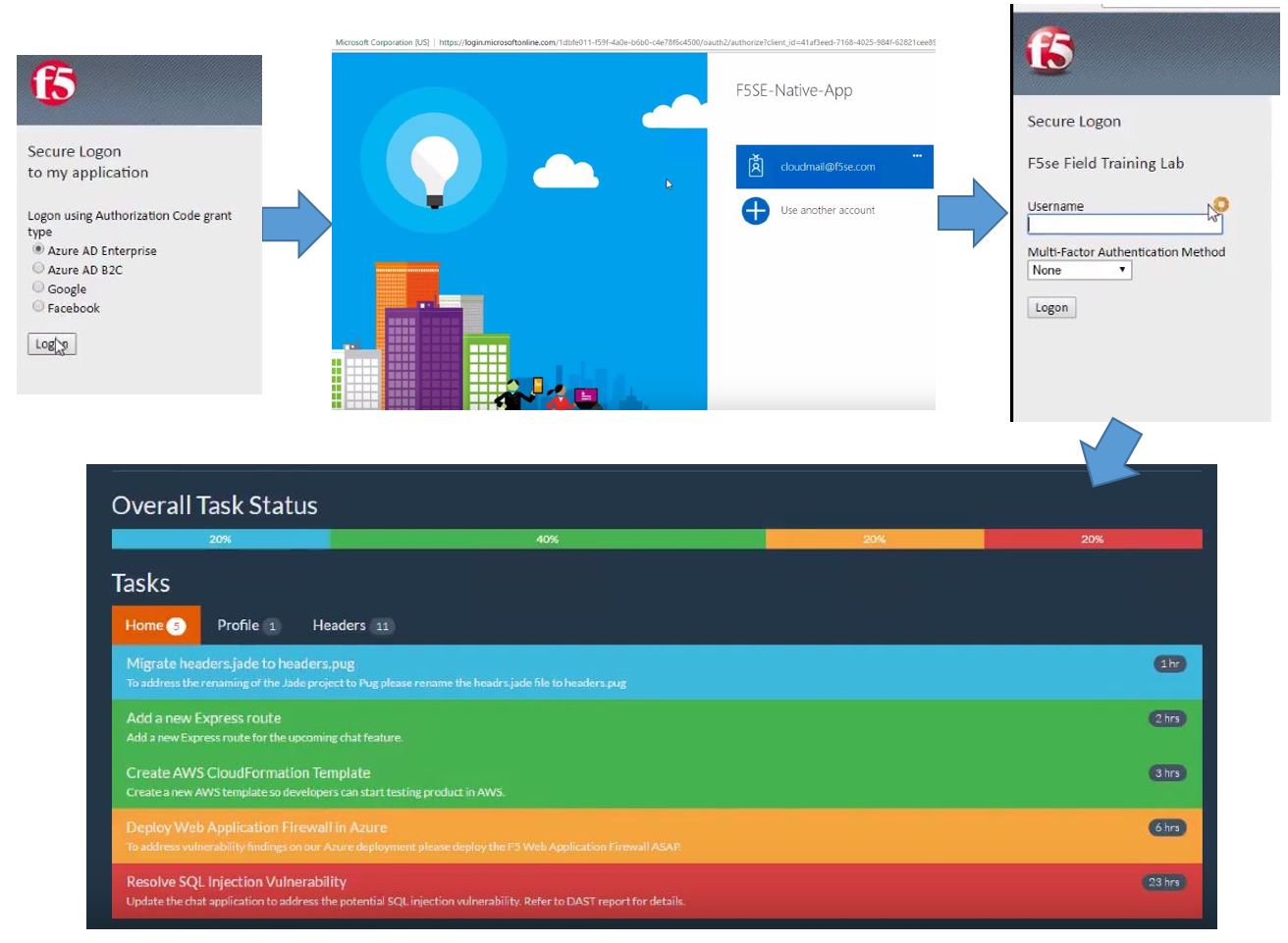
Let's look at BIG-IP’s capabilities (from the user's perspective) as an OAuth Client, OAuth Resource Server. We’ll navigate to our BIG-IP login screen and immediately you’ll notice it looks slightly different than your typical APM login.


Here, you now have a choice and can authenticate using any one of the 4 external resources. Azure AD Enterprise and AD B2C along with Google and Facebook. Google and Facebook are very popular social login choices - as shown in the initial image above - where organizations are looking to authenticate the users and allow them to authorize the sharing of information that Google and Facebook already have, with the application.

In this case, we have an application behind BIG-IP that is relying on getting such information from an external third party. For this, we’ll select Facebook. When we click logon, BIG-IP will redirect to the Facebook log into screen.

Now we’ll need to log into Facebook using our own personal information. And with that, Facebook has authenticated us and has sent BIG-IP critical info like name, email and other parameters.


BIG-IP has accepted the OAuth token passed to it from Facebook, extracted the info from the OAuth scope and now the application knows my identity and what resources I’m authorized to access.

We can do the same with Google. Select the option, click logon and here we’re redirected to the Google authentication page. Here again, we enter our personal credentials and arrive at the same work top.


Like Facebook, Google sent an authorization code to BIG-IP, BIG-IP validated it, extracted the username from the OAuth scope, passed it to the backend application so the application knows who I am and what I can access.

Let's look at Microsoft. For Microsoft, we can authenticate using a couple editions of Azure AD – Enterprise and B2C. Let’s see how Enterprise works. Like the others, we get redirected to Microsoftonline.com to enter our MS Enterprise credentials.

In this instance, we’re using an account that’s been Federated to Azure AD from another BIG-IP and we’ll authenticate to that BIG-IP. At this point that BIG-IP will issue a SAML assertion to Azure AD to authenticate me to Azure AD. After that, Azure AD will issue an OAuth token to that BIG-IP. BIG-IP will accept it, extract the user information and pass it to the application.

Finally, let’s see how Azure AD B2C works. B2C is something that companies can use to store their non-corporate user base. Folks like partners, suppliers, contractors, etc. B2C allows users to maintain their own accounts and personal information. In addition, they can login using a typical Microsoft account or a Google account. In this case, we’ll simply use a Microsoft account and are directed to the Microsoft authentication page.


We’ll enter our personal info, the servers communicate and we’re dropped into our WebTop of resources.

Social logins can not only help enterprises offer access to certain resources, it also improves the overall customer experience with speed and convenience and allows organizations to capture essential information about their online customers.

ps

Related: